Freebies With All Domain Names
Get freebies with all domain names at Register 365.
- Redeemed 103 times


Get freebies with all domain names at Register 365.
Earn up to €3.50 when you shop at Register 365 through Love Cashback.
Get co.uk domain for 1 year free at Register 365.
.Com domains are priced at €4.99 per year, making it simple and affordable to establish your online presence with Register 365.
Terms and conditions
Never miss cashback. Our free Chrome extension alerts you automatically at every partner store.
.ie domains are priced at €2.99 with Register 365, making it simple to establish an online presence.
Terms and conditions
Secure Business Basic Microsoft 365 with Register 365 for €21.99 per month, a key online service for your business.
Terms and conditions
Shop and get premium plan for €12.50 per month at Register 365.
Terms and conditions
Get yearly Microsoft Exchange packages from Register 365 for just €34.82 per month.
Terms and conditions
Get brilliant yearly email hosting packages with Register 365 for only €23.82 per month to keep your communications running smoothly.
Terms and conditions
Shop and get professional plan for €4.33 per month at Register 365.
Terms and conditions
Shop and get starter plan for €4.33 per month at Register 365.
Terms and conditions
Come and get free first-month website building at Register 365.
Terms and conditions
If you’re looking for a discount on your online purchase at Register 365 then you’ve come to the right place. All you have to do is follow the steps below to save money on your next online marketing, domains, website hosting and SSL certificates service purchase. There is always a sale or discount available at Register 365 to be redeemed, and it is our job here at Love Vouchers to provide you with these amazing voucher codes.
Step 1: Choose a voucher code from the ones listed above
Choose the voucher code from above that you’d like to redeem and it will reveal itself. For example, if you’re looking for 10% off orders at Register 365 then find the voucher above, and click on "Get Code" to reveal the code.
Step 2: Copy your voucher code
Simply copy the code that is presented to you. You need this code in order to inform Register 365 to remove part of the cost of your total order.
Step 3: Click on 'Go to the Register 365 site'
After you click, you will be directed to Register 365.
Step 4: Start Shopping!
Find the internet software product you’d like to purchase at Register 365 and add them to your cart.
Step 5: Make your purchase!
When you are ready to buy your items, go to Cart in the top right-hand corner. You can now start to make your purchase by clicking on 'CHECKOUT'. You will need to either sign in or create an account.
Step 6: Enter the code at the Register 365 checkout
Now that you have the code copied, simply paste it into the “Voucher Code” label at the checkout. Check out the image provided below for an example in case you have any difficulty. If you’re on a computer or laptop, then you will usually find the voucher code box to the left of the checkout page.
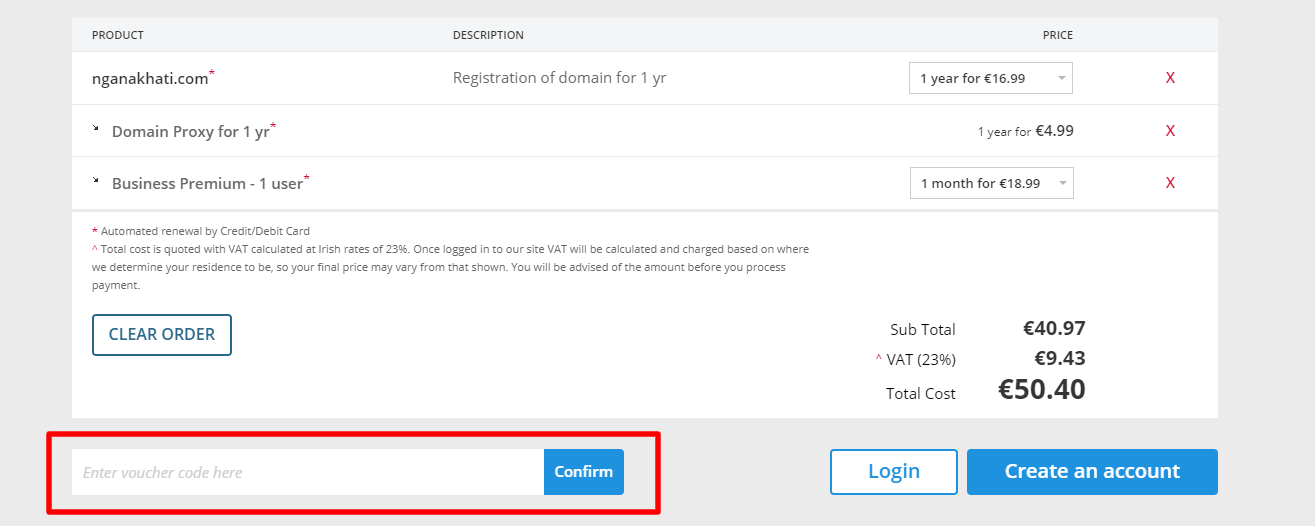
However, if you’re on a mobile then it is just as easy to find the voucher code box you need. It is usually present on the checkout form.
Step 7: Enjoy!
Your discount will be applied and confirmation for your software purchase will arrive in your email asap, happy shopping!
Always note: There are terms and conditions associated with certain codes which you must comply with (like applying a code after meeting a maximum amount of money spent) and you cannot apply a code after submitting your order.
Why is my Register 365 voucher code not working?
There are several reasons why your Register 365 code might not be working:
Based on our research, it appears that Register 365 does not offer any buy now, pay later options currently. You can contact Register 365 to see if there have been any updates or changes. You can also visit Register 365’s homepage to see if they have posted any updated information about buy now, pay later support.
Here are some great tips & tricks for extra savings at Register 365:
Register 365 prides itself in offering mega-discounts and unbeatable offers that you wouldn't find anywhere else! Register 365 always has something to give to their customers whether you already use their services or just starting out on elevating your business to the next level with advanced internet tools, Register 365 has got you covered! From 3 months free on their website builder, slashed prices on website hosting, limitless cPanel hosting and so much more, you are guaranteed to find a deal that meets your needs! Head over to the Register 365 website homepage and explore the special offers Register 365 has for you.

Register 365 offers a variety of software products and services, but the Register 365 name is especially synonymous with domains. A domain name is your website name and address, and a way of identifying websites on the internet in a user-friendly manner. Without domain names, web addresses would be just a bunch of numbers, making navigating the web a lot harder! Register 365 understands that creating a domain name and deciding can be such a long process, especially when you need to create something that is unique and already taken! That is why Register 365 has made the process hassle-free with their domain guides, which give you information to get you started on the domain process. You get awesome tips about domains including how to choose a domain name, choosing the right extension, what you can do with your domain and so much more! Visit the Register 365 website today and explore more exciting information about domains whilst getting all the help you need to kickstart your domain journey.

Not really tech-savvy, but want the best software for your personal, group, home or business use? Then Register 365 is your ultimate destination for all things advanced internet services as they offer you comprehensive product information through their blog. Register 365 will connect you to all the ins and outs that you need to know about all their products and services on offer on their comprehensive blog. The blog covers a wide range of topics from the importance of email marketing, web hosting tips, business recoveries and so much more. The Register 365 blog posts are so timeless, as information that was posted one year ago will still remain useful especially for new users! Visit the Register 365 website today and get all the information you need to stay updated on crucial product information and Register 365 news.

If you need to renew or cancel a product, use the guide below:
Totally! You can, by using the Register 365 Website Builder Free, which is free for 1 year when registering any domain name. Thereafter, you will be required to upgrade to the Register 365 Website Builder Lite product which will become chargeable as per the price outlined in the Register 365 price list. There is no obligation to upgrade. Standard terms and conditions of service apply.
This is the name that people use for their websites. A domain name is used by internet users to access a website.
Yes, Register 365 offers online marketing services, domain name registering services, security-related software among other services.
This is the filtering of unwanted, unsolicited emails that might contain viruses.
This is the most powerful blog and website creation platform in the whole world.
Yes, you can purchase their domain from anywhere in the world.
Every brand is different. Some brands release regular discount codes, some don’t release any and some release them at special times in the year. The Love Vouchers team spends countless hours every day searching for the best discount codes, and if Register 365 has offers available, then Register 365 will try to list them here.
Yes, Register 365 do use cookies on their site.
Love Vouchers spends most of their time collecting the best and most recent Register 365 discount codes. Love Vouchers also does their best to list how to use Register 365 discount codes. Read the content Love Vouchers writes for more information.
If you need to get in touch with Register 365 about an order, an inquiry, or anything else, there are a number of ways you can do this:
Phone
Give Register 365 a call at +44 (0) 1905 342340, and they will be more than happy to help.
Online Ticket Support
Contact Register 365 by raising a support ticket with your concerns and they will get back to you asap.
Facebook Messenger
You can DM Register 365 on their Facebook page and you’ll be directed to write your inquiry.
DM on Twitter
You can also send a direct message to Register 365 on their Twitter account and they will assist you promptly.
Register 365 is an online retailer that is open 24/7
You can speak to Register 365 via Phone Monday to Friday 8:00 am - 5:30 pm or via Ticket Support Monday to Friday 6:00 am - 7:00 pm Weekends & Bank Holidays 10:00 am - 3:00 pm. What makes Register 365 stand above other similar online retailers is their brilliant customer service. They put their customers as a top priority. Their team responds as quickly as possible and through various platforms like Facebook, Twitter and Email. Whatever your inquiry is, Register 365 is always there to help you!
Black Friday is one of the very few times a year that retailers offer unbeatable Register 365 discount codes and promotions for a wide variety of items. This holiday shopping season gives people the chance to go and get their most desired items from their favourite stores. Get some of the latest products including, home decor, Christmas gifts, new and cool gadgets, and so much more during this time of the year.
Have you considered saving more by using any Register 365 discount codes? At Love Vouchers, there are many codes and offers for different brands, you just need to go and grab one or more and be on your way to enjoy online shopping. You can also read through some of the information on Love Vouchers about Register 365 and learn more before purchasing.
Enjoy Black Friday shopping!
Sometimes people become so busy and miss out on opportunities to get the best deals during Black Friday. No need to worry as Cyber Monday is here. Cyber Monday is the Monday after Black Friday and deals are available for 24 hours. At this time, you can shop online for some great discount codes and promotions. The added advantage is you will be able to shop conveniently from your home.
At Love Vouchers, there are ways we can help you save money during this time. The need for you to go and search for the best Register 365 discount codes, deals or offers is not necessary, as we have done all that for you. Get all the latest Register 365 Cyber Monday money-saving deals, discounts and many offers from us and enjoy shopping at Register 365!
Have you heard of Register 365 Cyber Weekend? Well, it is real and it is a chance for you to get shopping if you have missed Black Friday and simply cannot wait for Cyber Monday. Cyber Weekend is the Saturday and Sunday before Cyber Monday, where you can get huge deals, promotions, and Register 365 discount codes on certain items at Register 365.
This shopping window of splendid deals, sales, offers, and discounts is open for 48 hours. Go and grab those things you’ve had your eye on at this time before they are no more. There are some great Register 365 Cyber Weekend discount codes and deals for your shopping pleasure at Love Vouchers. With more than 24 hours to decide what to purchase, you don't want to miss out, go ahead and get shopping!